CPM Mixed States
This tutorial reconstructs measured soft X-ray data with several mutually incoherent probe modes, the mixed-state model. A single coherent probe cannot explain data recorded with a partially coherent beam; mixed states can, and they give a cleaner object and a probe whose modes show how coherent the beam was.
What you'll learn:
- What the mixed-state model is and when it helps
- How to set the number of probe modes (
reconstruction.npsm) and keep them orthogonal - How to read the probe purity and the mode weights
References
- Mixed states: P. Thibault and A. Menzel, "Reconstructing state mixtures from diffraction measurements," Nature 494, 68–71 (2013). doi:10.1038/nature11806
- Dataset: L. Loetgering et al., "Generation and characterization of focused helical x-ray beams," Sci. Adv. 6, eaax8836 (2020). doi:10.1126/sciadv.aax8836
Dataset
The dataset (helicalbeam.hdf5, about 350 MB) is downloaded automatically into the example_data/ folder at the project root the first time you run the tutorial. If the file already exists it is not re-downloaded. It is part of L. Loetgering et al., "Generation and characterization of focused helical x-ray beams," Sci. Adv. 6, eaax8836 (2020).
Prerequisites
Complete CPM Example Data before this tutorial.
Run time
The two reconstructions take about half a minute on a GPU and considerably longer on a CPU.
Run it yourself
Run this tutorial as a Jupyter notebook, or as a Python script with python tutorial_mixedStates.py.
Mixed-state model
A conventional reconstruction assumes one coherent probe \(P\). In practice the beam is never fully coherent: the source has a finite size and bandwidth, and the beam and sample vibrate during an exposure. The detector then records an incoherent sum of several diffraction patterns. The mixed-state model describes this with \(M\) probe modes \(P_m\):
- \(I_j\): diffraction intensity at scan position \(j\), \(\mathbf{q}\): detector coordinate
- \(O\): object, \(\mathbf{r}_j\): scan position \(j\)
- \(\mathcal{D}\): propagation to the detector (
params.propagatorType)
Only the sum of the modes is fixed by the data, so any unitary mixture of them fits equally well. Orthogonalizing them (params.orthogonalizationSwitch) picks one representative: modes that are orthogonal to each other and sorted by power. The fraction of the total power in mode \(k\) is
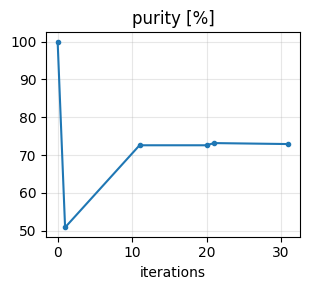
and the probe purity \(\mu = \sqrt{\sum_k w_k^2}\) summarizes them: \(\mu = 1\) for a single coherent mode, and \(\mu = 1/\sqrt{M}\) for \(M\) equally strong modes. PtyLab stores it in reconstruction.purityProbe each time it orthogonalizes.
Setup
Import the libraries and download the dataset.
import urllib.request

import matplotlib.pyplot as plt
import numpy as np

import PtyLab
from PtyLab import Engines
from PtyLab.io import getExampleDataFolder
from PtyLab.utils.visualisation import hsvplot

fileName = "helicalbeam.hdf5"
filePath = getExampleDataFolder() / fileName

if not filePath.exists():
    print(f"Downloading {fileName}..")
    urllib.request.urlretrieve("https://ndownloader.figshare.com/files/38419391", filePath)
    print("Download complete.")
else:
    print(f"{fileName} found, skipping download.")
Load the data. The file stores the scan positions as a (2, numFrames) array, which PtyLab transposes on loading.
The detector image can be flipped or transposed relative to the scan axes, depending on how the camera was mounted. setOrientation corrects this using the ptypy convention: 0 leaves the images unchanged, 1–3 flip columns, rows or both, and 4–7 transpose first and then flip in the same way. This dataset needs 4, a transpose.
The scan is heavily oversampled: neighbouring positions overlap far more than needed. Keeping every second frame halves the run time and leaves enough overlap. It does not change the geometry, since wavelength, distance and pixel sizes stay the same; call _setData() afterwards to update the derived quantities such as the number of frames.
experimentalData = PtyLab.ExperimentalData(filePath, operationMode="CPM")
experimentalData.setOrientation(4)

# keep every second scan position
experimentalData.ptychogram = experimentalData.ptychogram[::2]
experimentalData.encoder = experimentalData.encoder[::2]
experimentalData._setData()

print(f"{experimentalData.numFrames} frames of {experimentalData.Nd} x {experimentalData.Nd} pixels")
print(f"wavelength {experimentalData.wavelength * 1e9:.2f} nm, sample-detector distance {experimentalData.zo * 1e3:.0f} mm")

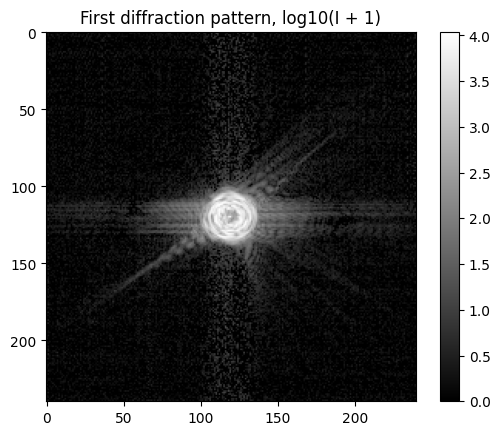
plt.imshow(np.log10(experimentalData.ptychogram[0] + 1), cmap="gray")
plt.title("First diffraction pattern, log10(I + 1)")
plt.colorbar()
plt.show()
Found encoder with shape (2, 1600)
Warning: Automatically changing the shape of encoder.
(1600, 2) [ 1.52465931e-22 -9.48676901e-22]
800 frames of 240 x 240 pixels
wavelength 2.48 nm, sample-detector distance 170 mm
Reconstruction settings
Both runs below share one Params object, since the settings are the same; only the number of probe modes differs. The settings that matter most for this dataset:
| Setting | Effect |
|---|---|
propagatorType = "Fresnel" |
the detector is in the Fresnel regime of the sample |
orthogonalizationSwitch |
orthogonalizes the probe modes every orthogonalizationFrequency iterations |
objectSmoothenessSwitch |
smooths the object amplitude over objectSmoothenessWidth pixels, which suppresses noise |
l2reg |
multiplies the object by \(1 - \alpha\) each iteration (\(\alpha\) = l2reg_object_aleph), so areas the data never update decay to zero |
probePowerCorrectionSwitch |
keeps the total probe power equal to the measured power |
comStabilizationSwitch |
keeps the probe centered in its frame |
params = PtyLab.Params()
params.propagatorType = "Fresnel"
params.fftshiftSwitch = True  # faster far-field updates with Fresnel or Fraunhofer
params.positionOrder = "random"
params.intensityConstraint = "standard"
params.probePowerCorrectionSwitch = True
params.orthogonalizationSwitch = True
params.orthogonalizationFrequency = 10
params.objectSmoothenessSwitch = True
params.objectSmoothenessWidth = 2
params.objectSmoothnessAleph = 1e-2
params.l2reg_object_aleph = 1e-1
params.couplingSwitch = True
params.couplingAleph = 1
The function below creates a fresh reconstruction with npsm probe modes, so that a single-mode and a mixed-state run start from the same initial guesses. With several modes, initializeObjectProbe() starts every mode as the same circular probe plus a small random perturbation of its own, which lets the modes separate during the reconstruction.
def make_reconstruction(npsm):
    reconstruction = PtyLab.Reconstruction(experimentalData, params)
    reconstruction.npsm = npsm  # number of probe modes
    reconstruction.nosm = 1
    reconstruction.nlambda = 1
    reconstruction.nslice = 1
    reconstruction.initialProbe = "circ"
    experimentalData.entrancePupilDiameter = reconstruction.Np / 3 * reconstruction.dxp
    reconstruction.initialObject = "ones"
    np.random.seed(0)  # same random perturbations of the initial guess in both runs
    reconstruction.initializeObjectProbe()
    return reconstruction
Each run takes two stages with mPIE. The first 20 iterations use the l2reg and center-of-mass constraints to settle the probe position and clear the area outside the scan. The last 20 switch both off, so the probe and object can refine freely.
def run(reconstruction):
    monitor = PtyLab.Monitor()
    monitor.figureUpdateFrequency = 10
    monitor.objectPlot = "abs"
    monitor.objectZoom = 1.5

    engine = Engines.mPIE(reconstruction, experimentalData, params, monitor)
    engine.betaProbe = 0.25
    engine.betaObject = 0.25
    engine.numIterations = 20

    params.l2reg = True
    params.comStabilizationSwitch = True
    engine.reconstruct()

    params.l2reg = False
    params.comStabilizationSwitch = False
    engine.reconstruct()
    return monitor
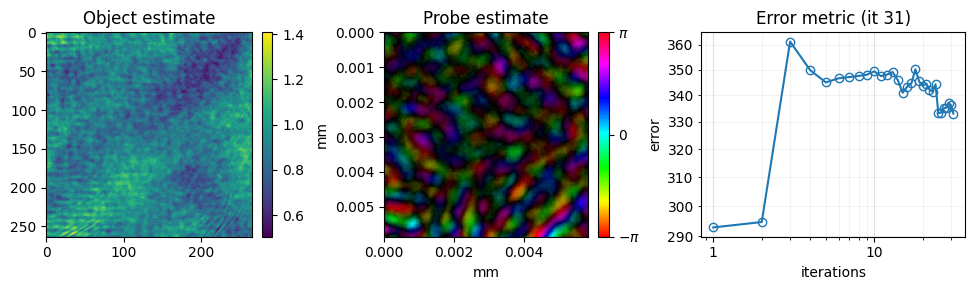
Single coherent probe
First, reconstruct with one probe mode:
check fftshift...
fftshift data for fast far-field update
Starting mPIE: 20 iterations on the GPU
Starting mPIE: 20 iterations on the GPU
Four probe modes
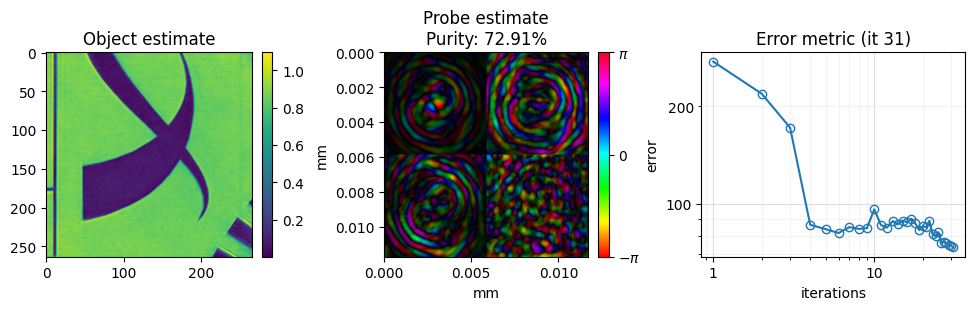
Now reconstruct with four probe modes and otherwise identical settings:
Comparison
The error measures the mismatch between measured and modeled intensities. With four modes the model can reproduce the incoherent background of the patterns, and the error drops further.
plt.semilogy(single.error, label="1 mode")
plt.semilogy(mixed.error, label="4 modes")
plt.xlabel("iteration")
plt.ylabel("error")
plt.legend()
plt.show()

print(f"final error, 1 mode : {single.error[-1]:.4g}")
print(f"final error, 4 modes: {mixed.error[-1]:.4g}")
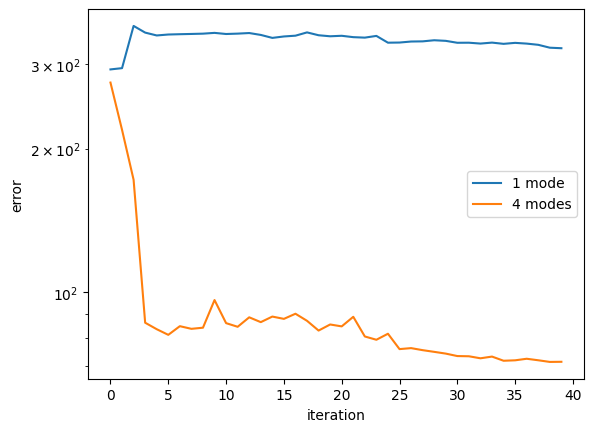
The probe modes are stored along axis 2 of reconstruction.probe. After the last orthogonalization they are sorted by power. The mode weights \(w_k\) and the purity show how much of the beam is described by the dominant coherent mode.
modes = mixed.probe[0, 0, :, 0]  # (npsm, Np, Np)
power = np.sum(np.abs(modes) ** 2, axis=(-2, -1))
weights = power / power.sum()

print("mode weights:", np.round(weights, 3))
print(f"purity from the weights: {np.sqrt(np.sum(weights**2)):.3f}")
print(f"purity stored by PtyLab: {mixed.purityProbe:.3f}")

fig, axes = plt.subplots(1, 4, figsize=(14, 3.8))
for k, ax in enumerate(axes):
    hsvplot(modes[k], ax=ax, pixelSize=mixed.dxp, axisUnit="um")
    ax.set_title(f"mode {k + 1}: {100 * weights[k]:.1f} %")
plt.tight_layout()
plt.show()
mode weights: [0.705 0.137 0.106 0.052]
purity from the weights: 0.728
purity stored by PtyLab: 0.729
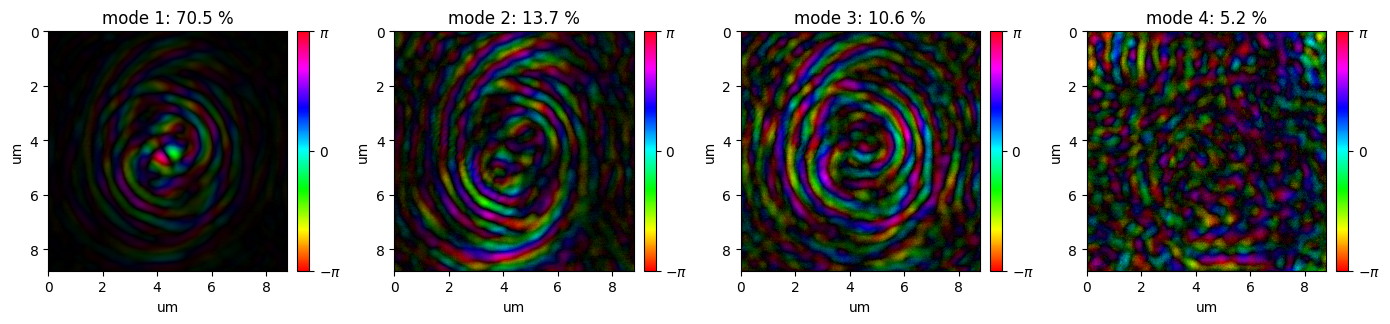
In these complex plots the brightness is the amplitude and the hue the phase. The modes show the spiral fringes of the helical beam in the sample plane. The dominant mode carries about 70 % of the power; the weaker modes carry the part of the beam that is not coherent with it.
Finally, compare the two object reconstructions:
fig, axes = plt.subplots(1, 2, figsize=(10, 4.8))
for ax, rec, title in zip(axes, [single, mixed], ["1 mode", "4 modes"]):
    ax.imshow(np.abs(rec.object[0, 0, 0, 0]), cmap="gray")
    ax.set_title(f"Object amplitude, {title}")
    ax.axis("off")
plt.tight_layout()
plt.show()
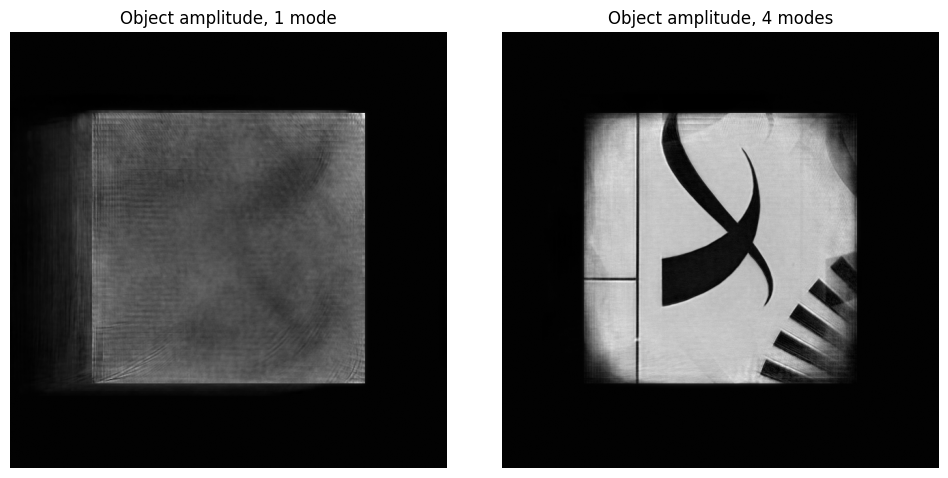
With one mode, the reconstruction has not found the object after 40 iterations: a single coherent probe cannot fit these partially coherent data. With four modes the test structures are resolved.
Finally, you can save the result.
# saves the result as HDF5, plus a PNG of the final reconstruction
mixed.saveResults("helicalbeam_mixed_states.hdf5", snapshot=monitor)
The reconstruction results (all) have been saved
Saved monitor figure helicalbeam_mixed_states_reconstruction.png
Saved monitor figure helicalbeam_mixed_states_history.png