Scan Grids
This tutorial shows how to design the scan grid of a CPM experiment, the set of sample positions at which a diffraction pattern is recorded. It compares the grid types in PtyLab.utils.scanGrids, shortens the path the stage travels between positions, and writes the positions to a text file for the stage controller.
What you'll learn:
- How to generate raster, concentric and Fermat spiral grids
- How to check the step size between neighbouring positions
- How to optimize the scan order with
tsp_gaand save it withgenerateTXT
References
- Fermat spiral scans: X. Huang et al., "Optimization of overlap uniformness for ptychography," Opt. Express 22, 12634 (2014). doi:10.1364/OE.22.012634
Dataset
No dataset is needed; this tutorial only generates positions.
Prerequisites
Complete CPM Simulation before this tutorial; it uses a Fermat grid to simulate data.
Run it yourself
Run this tutorial as a Jupyter notebook, or as a Python script with python tutorial_scanGrids.py.
import matplotlib.pyplot as plt
import numpy as np

from PtyLab.utils.scanGrids import (
    GenerateConcentricGrid,
    GenerateNonUniformFermat,
    GenerateRasterGrid,
    generateTXT,
    tsp_ga,
)
Grid types
Each generator returns two arrays, R (rows, y) and C (columns, x), one entry per scan position. The values are in grid units, usually object pixels: CPM Simulation multiplies them by the object pixel size dxo to get positions in meters.
| Function | Arguments | Grid |
|---|---|---|
GenerateRasterGrid(n, ds) |
n points per side, period ds |
square raster of n² points |
GenerateConcentricGrid(Nr, s, rend) |
Nr circles, spacing s along each circle, outer radius rend |
concentric circles |
GenerateNonUniformFermat(n, radius, power) |
n points inside radius |
Fermat spiral; power > 1 packs more points near the center |
GenerateFermatSpiral(n, c) |
n points, scale c |
the same spiral with power = 1, sized by c instead: its radius is \(c\sqrt{n}\) |
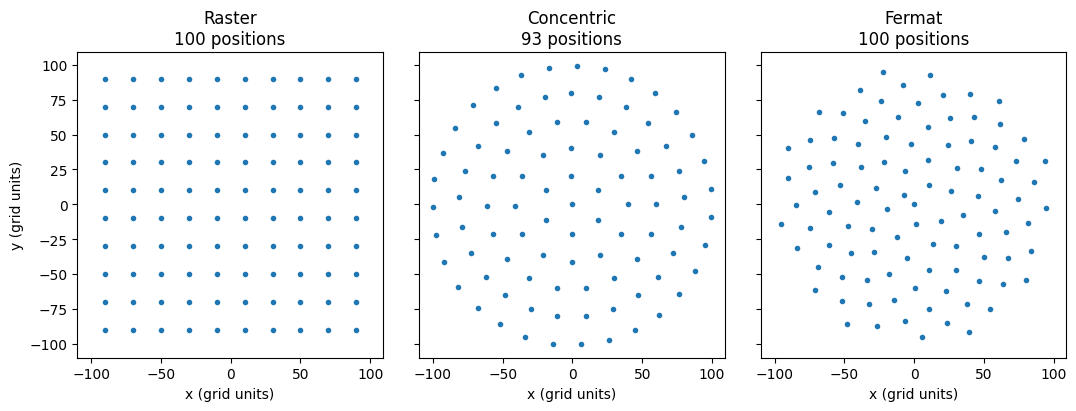
A raster grid is easy to set up but its periodicity causes artifacts in the reconstruction (the raster grid pathology): the probe and object can trade structure at the grid period without changing the data. Concentric and Fermat grids break this periodicity. Below, each grid covers roughly the same disk of radius 100 with about 100 positions.
grids = {
    "Raster": GenerateRasterGrid(10, 20),
    "Concentric": GenerateConcentricGrid(6, 20, 100),
    "Fermat": GenerateNonUniformFermat(100, radius=100, power=1),
}

fig, axes = plt.subplots(1, 3, figsize=(11, 3.8), sharex=True, sharey=True)
for ax, (name, (R, C)) in zip(axes, grids.items()):
    ax.plot(C, R, "o", ms=3)
    ax.set_title(f"{name}\n{len(R)} positions")
    ax.set_aspect("equal")
    ax.set_xlabel("x (grid units)")
axes[0].set_ylabel("y (grid units)")
plt.tight_layout()
plt.show()
Step size and overlap
Neighbouring illuminated areas must overlap; a common rule of thumb is that the step between neighbours is at most about 30 % of the probe diameter (60–70 % linear overlap). For each position the cell below finds the distance to its nearest neighbour; the mean of these is the typical step size of the grid.
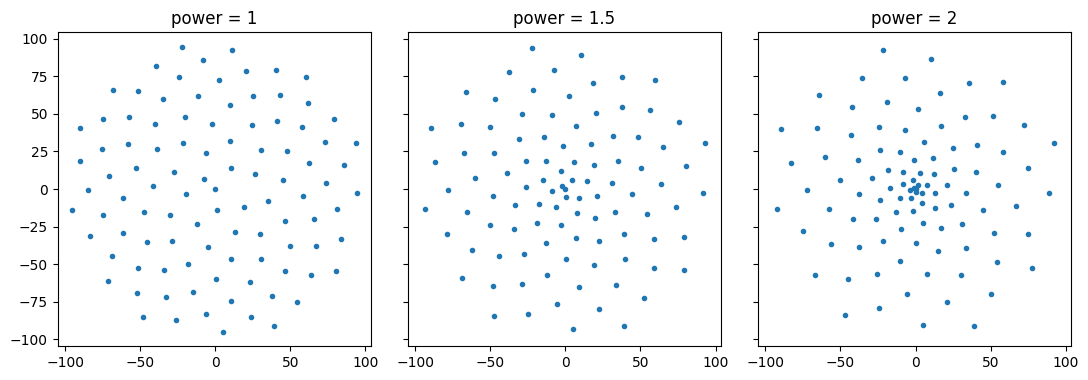
With power > 1, GenerateNonUniformFermat packs the positions near the center more densely, which helps when the probe is strongest there or the region of interest sits in the middle.
def nearest_neighbour_steps(R, C):
    """Distance from each position to its nearest neighbour, in grid units."""
    xy = np.stack([R, C], axis=1).astype(float)
    d = np.linalg.norm(xy[:, None, :] - xy[None, :, :], axis=-1)  # (n, n) distances
    np.fill_diagonal(d, np.inf)  # ignore the distance of a point to itself
    return d.min(axis=1)


for name, (R, C) in grids.items():
    steps = nearest_neighbour_steps(R, C)
    print(f"{name:12s} mean step {steps.mean():5.1f}, min {steps.min():5.1f}, max {steps.max():5.1f}")
Raster       mean step  20.0, min  20.0, max  20.0
Concentric   mean step  19.9, min  19.1, max  20.6
Fermat       mean step  16.6, min  10.0, max  17.1
fig, axes = plt.subplots(1, 3, figsize=(11, 3.8), sharex=True, sharey=True)
for ax, power in zip(axes, [1, 1.5, 2]):
    R, C = GenerateNonUniformFermat(100, radius=100, power=power)
    ax.plot(C, R, "o", ms=3)
    ax.set_title(f"power = {power}")
    ax.set_aspect("equal")
plt.tight_layout()
plt.show()
Shortest scan path
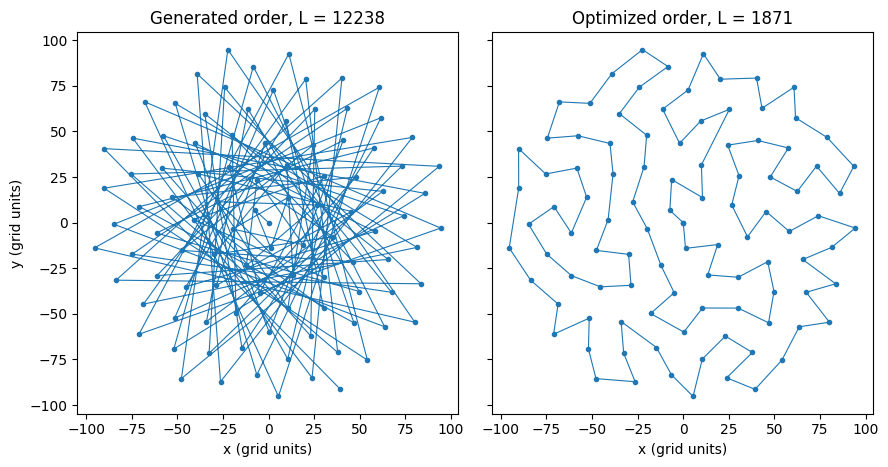
The generators return the positions in an order that makes the stage jump back and forth across the sample. Visiting them in a different order does not change the data, but it shortens the total travel distance and the measurement time.
Finding the shortest closed path through all positions is the travelling salesman problem. tsp_ga solves it approximately with a genetic algorithm: it keeps a population of candidate routes, and in each iteration mutates the best route of every group of four by flipping, swapping or sliding a random section. The total path length is
where \(\mathbf{r}_k = (R_k, C_k)\) is the \(k\)-th position along the route and \(n\) the number of positions. converge() returns the visiting order as indices, starting and ending at position 0. plotUpdateFrequency sets how many times the progress is printed; tsp_ga labels the distance in um, but it is in the same units as R and C.
R, C = GenerateNonUniformFermat(100, radius=100, power=1)


def path_length(R, C):
    return np.sum(np.sqrt(np.diff(R) ** 2 + np.diff(C) ** 2))


print(f"path length in generated order: {path_length(R, C):.0f} grid units")

np.random.seed(0)  # the genetic algorithm is random; fix the seed for a reproducible route
optRoute = tsp_ga(R, C, population_size=40, iterations=5000, plotUpdateFrequency=5).converge()
plt.close(999)  # tsp_ga draws its progress in figure 999; the comparison below replaces it
Rnew, Cnew = R[optRoute], C[optRoute]
print(f"path length after optimization: {path_length(Rnew, Cnew):.0f} grid units")
path length in generated order: 12238 grid units
distance: 2474 um, numIteration: 0,
distance: 2020 um, numIteration: 1000,
distance: 1945 um, numIteration: 2000,
distance: 1924 um, numIteration: 3000,
distance: 1900 um, numIteration: 4000,
path length after optimization: 1871 grid units
fig, axes = plt.subplots(1, 2, figsize=(9, 4.5), sharex=True, sharey=True)
axes[0].plot(C, R, "o-", ms=3, lw=0.8)
axes[0].set_title(f"Generated order, L = {path_length(R, C):.0f}")
axes[1].plot(Cnew, Rnew, "o-", ms=3, lw=0.8)
axes[1].set_title(f"Optimized order, L = {path_length(Rnew, Cnew):.0f}")
for ax in axes:
    ax.set_aspect("equal")
    ax.set_xlabel("x (grid units)")
axes[0].set_ylabel("y (grid units)")
plt.tight_layout()
plt.show()
Save the positions
generateTXT(R, C, fileName) writes the positions to <fileName>.txt: a header with the number of positions and the column names, then one row column pair per line. Convert the grid units to the stage's units (here micrometers) before writing. The last entry of optRoute returns to the start, so drop it.
stepSize = 2  # micrometers per grid unit, chosen for this example
generateTXT(Rnew[:-1] * stepSize, Cnew[:-1] * stepSize, fileName="positions")

with open("positions.txt") as f:
    print("".join(f.readlines()[:5]))
number of positions: 100
y (row) [um] | x (col) [um]
0.0 0.0
-28.17595156146098 2.4730049749655962
-24.002431256746053 37.73437814202297
To use a grid in a simulation, convert it to positions in meters and store them in encoder, as in CPM Simulation: